Supported Media Sources
7S Video & Music Gallery brings content from different video and music platforms together in one gallery. Use sharing links from external platforms, direct audio and video file URLs, or your own files uploaded to the WordPress Media Library.
This guide describes the sources, URL formats and playback conditions supported in version 2.5.
Contents
- Supported video platforms
- Supported music platforms
- WordPress Media Library (Self-hosted Media)
- Direct media URLs
- Add media sources and automatic detection
- Automatic cover images
- Playback and access conditions
- Upcoming video platforms and features (Coming Soon)
1. Supported video platforms
YouTube
Add standard YouTube videos, short sharing links, Shorts, live stream links and playlists. The plugin creates a YouTube player using the video or playlist ID in the URL. The video must allow embedding on external websites.
| URL type | Format |
|---|---|
| Standard video | https://www.youtube.com/watch?v=VIDEO_ID |
| Short link | https://youtu.be/VIDEO_ID |
| Shorts | https://www.youtube.com/shorts/VIDEO_ID |
| Live stream | https://www.youtube.com/live/VIDEO_ID |
| Playlist | https://www.youtube.com/playlist?list=LIST_ID |
The YouTube player provides playback, volume, quality and fullscreen controls as permitted by the video owner. Enable YouTube privacy in Player settings to use the privacy-enhanced embed address.
Vimeo
Vimeo video sharing links and direct Vimeo player URLs are supported. Unlisted video links may also contain a privacy hash. The plugin does not bypass Vimeo’s password, domain or embedding restrictions.
| URL type | Format |
|---|---|
| Standard video | https://vimeo.com/VIDEO_ID |
| Player URL | https://player.vimeo.com/video/VIDEO_ID |
| Unlisted video | https://vimeo.com/VIDEO_ID/PRIVACY_HASH |
2. Supported music platforms
External music uses the source platform’s own embedded player. Track, album and playlist support varies by platform.
| Platform | Supported URL types | Example format |
|---|---|---|
| Spotify | Track, album, playlist, artist, podcast show and episode. | https://open.spotify.com/track/TRACK_ID |
| Apple Music | Track, album and other content URLs permitted by the service for embedding. | https://music.apple.com/tr/album/ALBUM_NAME/ALBUM_ID |
| SoundCloud | Tracks and supported set / playlist URLs. | https://soundcloud.com/ARTIST/TRACK |
| Deezer | Track, album, playlist, artist, podcast show and episode. | https://www.deezer.com/track/TRACK_ID |
| YouTube Music | Music links containing a video or playlist ID. | https://music.youtube.com/watch?v=VIDEO_ID |
Playback for Apple Music and SoundCloud depends on the URL type and provider embedding support. YouTube Music links are classified as Audio / Music and presented with a YouTube-based player. Spotify and Deezer recognize the URL types above; full playback depends on service permissions.
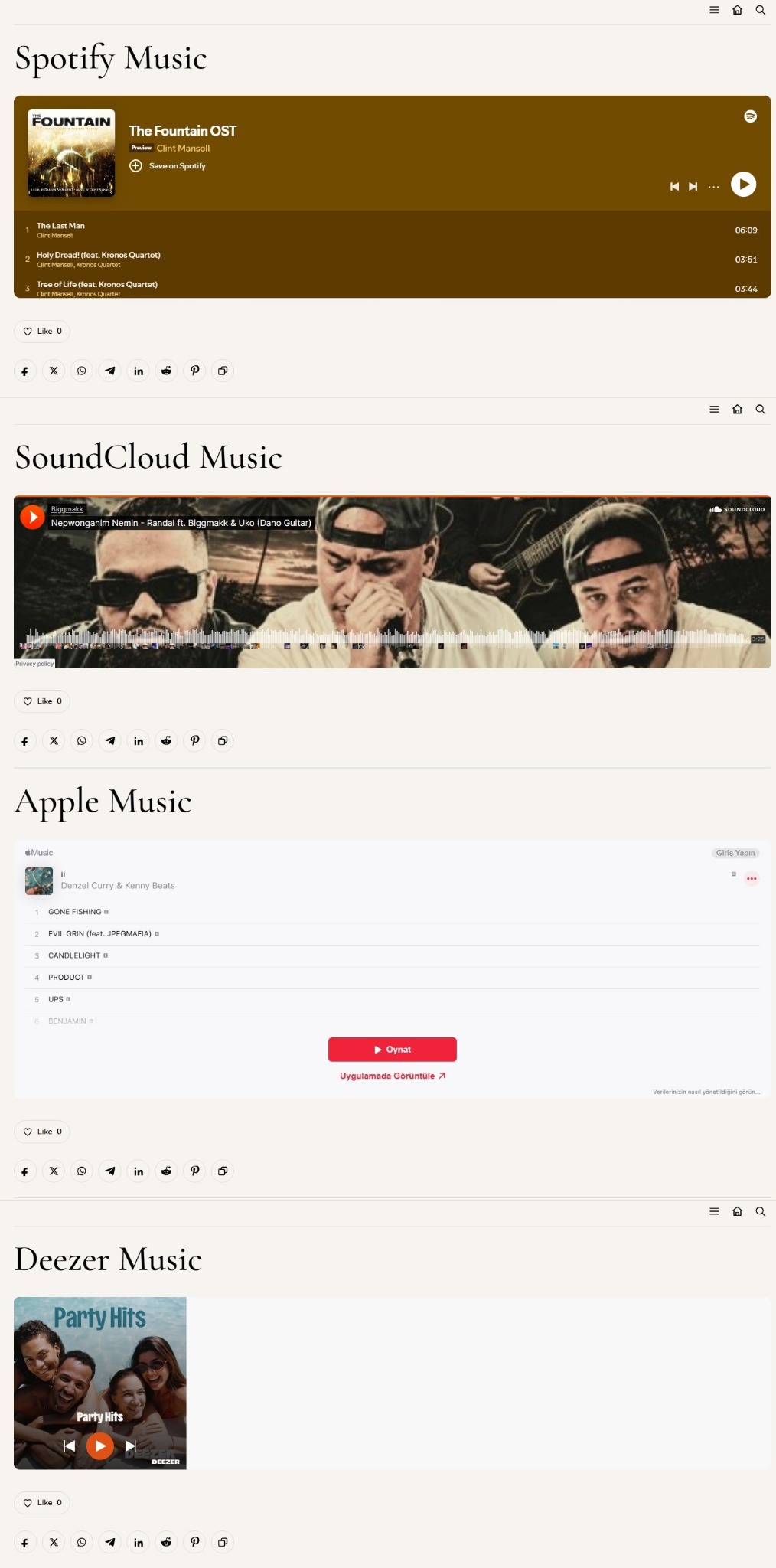 Enlarge ⤢
3. WordPress Media Library (Self-hosted Media)
You do not have to upload your video or music to an external platform. Select files hosted on your own site from the WordPress Media Library or upload new files. The single media page uses WordPress’s built-in audio or video player.
- Create a media item under 7S Gallery → Add New.
- Choose Video or Audio / Music in Media Source.
- Select the appropriate local file source and a file from the Media Library.
- Check Player Preview, the cover image and other details, then publish.
The file must match the content type: a video file for video or an audio file for music. Supported upload formats depend on WordPress and server permissions; playback support depends on browser and file codecs. MP4 (H.264/AAC) video and MP3 audio are good starting points for broad compatibility. Local files use your hosting account’s storage and bandwidth.
4. Direct media URLs
You can also use the direct URL of a video or audio file hosted on another server. The URL must point to the media file itself; a file-sharing download page or an arbitrary web page is not sufficient.
| Media type | Extensions automatically recognized in version 2.5 | Example URL |
|---|---|---|
| Video | MP4, WebM, OGV, M3U8 | https://example.com/media/video.mp4 |
| Audio / Music | MP3, M4A, WAV, OGG, OGA, AAC | https://example.com/media/music.mp3 |
Recognition of a file extension does not guarantee playback in every browser. In particular, M3U8 (HLS) links depend on browser and player HLS support. The file URL must be accessible, the server must provide the appropriate media type, and the necessary network permissions must be in place. Expiring or authenticated URLs may not work for visitors.
5. Add media sources and automatic detection
Copy the sharing link from a supported platform. Enter it in 7S Gallery → Add New → Media Source. The plugin identifies the media type and source from recognized domains and file extensions. Use the URL itself rather than a full iframe or HTML embed code.
Check the link in Player Preview. A platform homepage or a URL without a content ID may not be a valid media source. For services such as Spotify and Deezer, use the full content URL rather than a redirecting short link. Uppercase IDs and names in the examples are placeholders; enter your own media URL.
The same sources can be used when creating lists. Choose Gallery Content, Media Library or External Media to add different sources to one list. Adding a provider’s playlist URL as one media item does not turn its individual tracks into separate 7S Gallery records.
See Adding Video and Music · Adding Items to Lists.
6. Automatic cover images
Source cover retrieval is supported for YouTube, YouTube Music, Vimeo, Spotify, Apple Music, SoundCloud and Deezer. The plugin attempts to retrieve a suitable source image and, if successful, stores it in the WordPress Media Library. Cover support varies by URL type. For example, a YouTube URL containing only a playlist ID may not provide an individual video thumbnail. Deezer automatic covers are limited to track, album, playlist and artist URLs.
You can select your own image or use the source cover refresh tool. If no source cover is available and no custom image exists, the plugin attempts to generate a default cover. Do not expect platform covers for local or direct media files.
See Categories, Tags and Covers.
7. Playback and access conditions
| Condition | Explanation |
|---|---|
| Embedding permission | The content owner and provider must allow playback on external websites. |
| Full track / preview | Music services may provide a short preview depending on content type, subscription, account or region. |
| Autoplay | Depends on browser and provider permissions. Enabling the setting alone may not be sufficient. |
| Automatic next-item playback | End-event support is available for local/direct playable media, YouTube, YouTube Music and Vimeo. Other external music platforms do not have dedicated end-event integration in this release. |
| External services | Removed content, URL changes and provider policies may affect playback. |
Use only content you have permission to publish and share. The plugin does not remove provider access or copyright restrictions. See Player for settings and examples, and Playback Behavior for list playback conditions.
8. Upcoming video platforms and features (Coming Soon)
The following integrations are planned to expand 7S Video & Music Gallery’s video source support:
| Platform | Planned support |
|---|---|
| Dailymotion | Video URLs and embedded player. |
| Rumble | Supported video URLs and embedded player. |
| Public videos permitted for embedding. | |
| X (Twitter) | Embeddable posts containing video. |
| TikTok | Public, embeddable videos, provided visitors can watch without signing in. |
| Instagram Reels | Public Reels permitted for website embedding, provided visitors can watch without signing in. |
Shorts-style vertical video layout
A mobile-first 9:16 viewing experience is planned for short vertical videos. The goal is to offer a view where visitors can move between videos by scrolling vertically. This is a separate gallery presentation mode, not a new media provider. YouTube Shorts URLs are already supported; the planned enhancement is to present them as a vertical video feed.
Note: These platforms and the vertical video layout are not yet available. Final URL types, playback capabilities and release timing will be announced after development and compatibility testing. External platform support depends on provider embedding permissions. TikTok and Instagram Reels must pass playback tests inside the gallery on desktop and mobile browsers without requiring visitors to sign in before release. Content requiring sign-in or restricted access will not be supported.